Showing posts with label Facebook Tricks. Show all posts

Tuesday, 23 October 2012

Awesome And Simple Softwaresntrick-Social Widget With Subscription Box

Awesome And Simple Softwaresntrick-Social Widget With Subscription Box

Am sharing with you again another cool subscription box which comprises of subscription box, and social sharing buttons. In my previous post, there is so so many widgets and it is another to that is simple but stylish. I have design it to the perfect taste so that it wouldn't affect your blog loading time. To add this subscription box to your blog, In this I put a Email subscription from and three social sharing link FaceBook, Twitter, LinkedIn, Google+, YouTube, Rss And Other Social , so that this widget fulfill your both requirement. I used CSS3 to rotate these on hover design this widget so it take only few seconds to load. This Widget can be add in Blogger, WordPress or Any other HTML website. simply follow the few steps below.


Features:
1.) Social Network Icon With Subscription Box.
2.) Twist The Icons On Hover.
3.) FaceBook, Twitter, LinkedIn, Google+, YouTube, Rss And Other Social.
4.) Simple And Stylish Design.
5.) HD Icons.
6.) Quick To Load CSS.


How To Add In Blogspot?
1.) Go To Your www.blogger.com
2.) Open Your Desire Blog.
3.) Go To Layout.
4.) Click "Add A Gadget" Where You Want To Add It.
5.) Now Scroll To "HTML-JAVASCRIPT"
6.) Click "+" Icon To Add It.
7.) Now Copy The Below Code And Paste It To There.
8.) Leave The Title Empty.
9.) Click Save, Now You Are Done.


How To Add In Website?
1.) Just Go To Your HTML File.
2.) Now Copy The Below Code And Paste It Between <body> </body>.
3.) Save It, Now You Are Done.


<!-- This Is A CopyRight Code Of softwaresntrick.It Is Free To Use But With HTML Design Code.If AnyOne Found To Be Changing This Code Should Be Under Legal Action Via DMCA. -->
<style>
#exeideasbody {
background:#f8f8f8;
margin:0 0 40px 0;
padding:10px;
border: 3px outset #ff0000; -moz-border-radius: 10px; border-radius: 10px;
overflow:hidden;
font-size: 14px;
}
.spinning_icons a{
width:36px;
height:36px;
display:inline-block;
text-indent:-9999em;
background-position:0 0;
background-repeat:no-repeat;
z-index:2000;
overflow:hidden;
}
.spinning_icons a:hover{
transform: rotate(360deg);
-webkit-transform: rotate(360deg);
-moz-transform: rotate(360deg);
transition: transform 0.2s ease-out;
-webkit-transition: -webkit-transform 0.2s ease-out;
-moz-transition: -moz-transform 0.2s ease-out;
}
.twitter{ background:url('https://blogger.googleusercontent.com/img/b/R29vZ2xl/AVvXsEjxwuj-DLGAkIoXJT-TRcTtlPb7yCYnnwRDhU1kiT0g2cJ_hxDMGq0SX_nQt7XhvDlCnRrXlkq_NZMc5QIRMKTQnUlSiBMMT0_s-2kiqBx2cVL7K1uuokvG2cYMczTRYqu3FFhKLNpuIJ4/s0/twitter.png'); }
.facebook{ background:url('https://blogger.googleusercontent.com/img/b/R29vZ2xl/AVvXsEiUgkQc-RqFmlr3SAxaR_ue6qwzmLdGqfZfTE_6zX8EeCIUEB-lggweX-T5cqoWYTY45Y3RZ9k5Et0CnSRW3uhHR8x3awmIDQ0rS-h_iNx-qC8OIJhu1ed1_V2HgEDDzF4NddK91f5b5BU/s0/facebook.png'); }
.linkedin{ background:url('https://blogger.googleusercontent.com/img/b/R29vZ2xl/AVvXsEhrDNnbExQra8b8FO-i8cwM7-jIElOuD64dYpDxVLFFRGlmPNUhuLYcK64RzjkvuKGlKy-_RUg_YnSZCbZ4deonWjzcWFUZQVaqwbQfb-5wBvnJ2pl1RlbNcIApiDGtQJKdx-OGr90Wxg0/s0/linkedin.png'); }
.rss{ background:url('https://blogger.googleusercontent.com/img/b/R29vZ2xl/AVvXsEjp4l9-Mc5U6X9_8nD902GpY4sTyIspLBJZbwuIw4EPdUi0su4nfgp2e6EU_n8cxDbbH6tklSfe01a2CvXrAmLV-aKcjuKj5FRRajTosRch1Zudx1x_NaV2xbQZaq05fbW1oXmXRiUZp08/s0/rss.png'); }
.youtube{ background:url('https://lh6.googleusercontent.com/-EjnvqvxdSIQ/T40l3XSfhlI/AAAAAAAAB9s/4VnPEZgDXSQ/s32/YouTube.png'); }
.googleplus{ background:url('https://blogger.googleusercontent.com/img/b/R29vZ2xl/AVvXsEjinrQqgMp6vX6NraWcUdEAfLifh3m6JZ8GTyTum4qAw44D942IqJvydvbubtmDDnxpTaZ4v7pE_3SQnVMHUUK-VocW__7R0mcSSnrfbmqiNBeQltqR8wJ3AlCCKKsVjYOE5XG-AxWgOrw/s0/gplus.png.png'); }
.mixsocial{ background:url('https://lh6.googleusercontent.com/-xcHvGi2TpZk/T6jP9vrvTMI/AAAAAAAACGg/7mFW9zJeCic/s32/myspace.png'); }
#email-news-subscribe .email-box{
padding: 5px 10px;
font-family: "Arial","Helvetica",sans-serif;
height:35px;}
#email-news-subscribe .email-box input.email{
background:#FFFFFF;
border: 1px solid #dedede;
color: #999;
padding: 7px 10px 8px 10px;
-moz-border-radius: 3px;
-webkit-border-radius: 3px;
-o-border-radius: 3px;
-ms-border-radius: 3px;
-khtml-border-radius: 3px;
border-radius: 3px;
border-image: initial;
font-family: "Arial","Helvetica",sans-serif;}
#email-news-subscribe .email-box input.email:focus{color:#333}
#email-news-subscribe .email-box input.subscribe{
background: -moz-linear-gradient(center top,#FFCA00 0,#FF9B00 100%);
background: -webkit-gradient(linear,left top,left bottom,color-stop(0,#FFCA00),color-stop(1,#FF9B00));
background: -moz-linear-gradient(center top,#FFCA00 0,#FF9B00 100%);
-pie-background: linear-gradient(270deg,#ffca00,#ff9b00);
font-family: "Arial","Helvetica",sans-serif;
border-radius:3px;
-moz-border-radius:3px;
-webkit-border-radius:3px;
border:1px solid #cc7c00;
color:white;
text-shadow:#d08d00 1px 1px 0;
padding:7px 14px;
margin-left:3px;
font-weight:bold;
font-size:12px;
cursor:pointer;
border-image: initial;}
#email-news-subscribe .email-box input.subscribe:hover{
background: #ff9b00;
background-image:-moz-linear-gradient(top,#ffda4d,#ff9b00);
background-image:-webkit-gradient(linear,left top,left bottom,from(#ffda4d),to(#ff9b00));
filter:progid:DXImageTransform.Microsoft.Gradient(startColorStr=#ffffff,endColorStr=#ebebeb);
outline:0;-moz-box-shadow:0 0 3px #999;
-webkit-box-shadow:0 0 3px #999;
box-shadow:0 0 3px #999
background:-webkit-gradient(linear,left top,left bottom,color-stop(0,#ffda4d),color-stop(1,#ff9b00));
background:-moz-linear-gradient(center top,#ffda4d 0,#ff9b00 100%);
-pie-background:linear-gradient(270deg,#ffda4d,#ff9b00);
border-radius:3px;
-moz-border-radius:3px;
-webkit-border-radius:3px;
border:1px solid #cc7c00;
color:#FFFFFF;
text-shadow:#d08d00 1px 1px 0}
</style>
<!--[if IE]>
<style>
#email-news-subscribe .email-box input.subscribe{
background: #FFCA00;
}
</style>
<![endif]-->
<center id="exeideasbody">
<div class="spinning_icons">
<a href="http://twitter.com/Arnydgreat" class="twitter" title="twitter">Twitter</a>
<a href="http://facebook.com/MediaFireMoviesHeaven" class="facebook" title="facebook">Facebook</a>
<a href="http://pk.linkedin.com/in/Profile" class="linkedin" title="linkedin">Linkedin</a>
<a href="https://plus.google.com/102256859586166648016" class="googleplus" title="Google Plus">Google Plus</a>
<a href="http://feeds.feedburner.com/EXEIdeas" class="rss" title="rss">RSS</a>
<a href="http://www.youtube.com/softwaresntrick" class="youtube" title="youtube">YouTube</a>
<a href="http://www.softwaresntrick.blogspot.in/p/about-us.html" class="mixsocial" title="Other Social">Social</a>
</div>
<div id="email-news-subscribe">
<div class="email-box">
<form action="http://feedburner.google.com/fb/a/mailverify" method="post" target="popupwindow" onsubmit="window.open('http://feedburner.google.com/fb/a/mailverify?uri=softwaresntrick', 'popupwindow', 'scrollbars=yes,width=550,height=520');return true">
<input class="email" type="text" style="width: 150px; font-size: 12px;" id="email" name="email" value="Enter Your Email here.." onfocus="if(this.value==this.defaultValue)this.value=&#39;&#39;;" onblur="if(this.value==&#39;&#39;)this.value=this.defaultValue;" />
<input type="hidden" value="softwaresntrick" name="uri" />
<input type="hidden" name="loc" value="en_US" />
<input class="subscribe" name="commit" type="submit" value="Subscribe" />
</form>
</div>
</div>
</center>
<!-- This Is A CopyRight Code Of Softwaresntrick.It Is Free To Use But With HTML Design Code.If AnyOne Found To Be Changing This Code Should Be Under Legal Action Via DMCA. -->

Customization:
1.) Change MediafireMoviesHeaven With Your FacebookLinks.
2.) Change Arnydgreat With Your Twitter Account.
3.) Change Softwaresntrick with your youtube channel Name
4.) Change softwaresntrick withyour linkedin account.
4.) Save And Done.


Add Stylish Animated Socxial Sharing Bar Widget To Blogger

Add Stylish Animated Social Sharing Bar Widget To Blogger

Social networks can make a big difference on the popularity of a blog. Sites that communicate better and understand social media are usually the most popular.A move towards this goal would be to find a way to encourage your visitors to share your content on the networks they are most active on.Today we are doing just that, by using pure JavaScript with the jQuery framework, to make an animated sharing bar, which will enable your website visitors to share posts on a number of social networks.Now the question is How To Add Animated Sharing Bar To Blogger?


Features:
1.) Awesome Animated Social Sharing Widget.
2.) Automatically Rotating But Stop On Hover.
3.) Digg Share With Count Button.
4.) Tweet With Count Button.
5.) Facebook Share With Count Button.
6.) Reddit Share With Count Button.
7.) DZone Share  With Count Button.


How To Add In Blogspot?
1.) Go To Your www.blogger.com
2.) Open Your Desire Blog.
3.) Go To Edit HTML..
4.) Press "CTRL+F" And Find These Line.
     <div class='post-footer-line post-footer-line-2'/>
     <div class='post-footer-line post-footer-line-3'/>
     </div>
     </div>
5.) Now Copy The Below Code And Paste It Below The Above Code.
6.) Click Save, Now You Are Done.


<style type="text/css">
.exespotlightmenu{
width: 100%;
overflow:hidden;
}
.exespotlightmenu ul{
margin: 0;
padding: 0;
font: bold 14px Verdana; /* font style and size */
list-style-type: none;
text-align: center; /* "left", "center", or "right" align menu */
}
.exespotlightmenu li{
display: inline-block;
position:relative;
padding: 5px;
margin: 0;
margin-right: 5px; /* right margin between menu items */
}
.exespotlightmenu li a{
display:inline-block;
padding: 5px;
min-width:50px; /* horizontal diameter of spotlight */
height:50px; /* vertical diameter of spotlight */
text-decoration: none;
color: black;
margin: 0 auto;
overflow:hidden;
-moz-transition: all 0.5s ease-in-out; /* CSS3 transition to animate all A properties */
-webkit-transition: all 0.3s ease-in-out;
-o-transition: all 0.3s ease-in-out;
-moz-transition: all 0.3s ease-in-out;
-ms-transition: all 0.3s ease-in-out;
transition: all 0.3s ease-in-out;
}
.exespotlightmenu li:hover a{
color: white;
background: #a71b15; /* background color of spotlight */
-webkit-border-radius: 50%; /* large radius to create circular borders */
-moz-border-radius: 50%;
border-radius: 50%;
}
.exespotlightmenu li a exespan{
position:relative;
top:35%; /* move text down so it appears centered within menu item */
}
</style>
<div class="exespotlightmenu">
<ul>
<li><a href="##########"><exespan>Home</exespan></a></li>
<li><a href="##########"><exespan>About</exespan></a></li>
<li><a href="##########"><exespan>Portfolio</exespan></a></li>
<li><a href="##########"><exespan>Privacy</exespan></a></li>
<li><a href="##########"><exespan>Contact Us</exespan></a></li>
</ul>
</div>

Customization:
1.) This Widget Did Not Require Any Customization.
2.) This Widget Will Shown Up On Post Page Only.
3.) If You Want Any Customization, Feel Free To Ask.

Source:www.exeideas.com

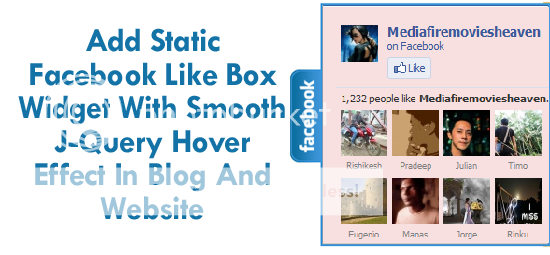
Add Static Facebook Like Box With Smooth J-Query Hover Effect In Blog Or WebSite

Add Static Facebook Like Box Widget With Smooth J-Query Hover Effect In Blog And Website

Facebook jquery pop up for facebook like box widget for bloggers (or) website. Advantages this widget is to free space on the page. Because Facebook can prevent website normal as the box. Static Pop Out Facebook as soft box with jQuery effect of activation for the blogger, this is another cool control. Here I have added as the box with simple jQuery hover effect. See Facebook static plate to the right of the page and move the mouse over the plate with the frame, as is visible by sliding to the left.
Just add it now and increase your fans and spice up your blog and website by saving space and having awesome look.


Features:
1.) J-Query POP OUT On Mouse Hover.
2.) Facebook Awesome Big Fans Widget.
3.) Quick To Load And Easy To Install.
4.) Awesome, Simple, Stylish And Beautiful Designed Latest Widget.
5) You Can Also Add This On Website. (Feel Free To Ask How To Do This?)


How To Add In Blogspot?
1.) Go To Your www.blogger.com
2.) Open Your Desire Blog.
3.) Go To Edit HTMlL
4.) Now Press {CTRL+F} And Find </head>.
5.) Now Copy The Below Code And Paste It Before </head> .
6.) Click Save, Now Proceed To The Next Step.


<script src='http://ajax.googleapis.com/ajax/libs/jquery/1.4.2/jquery.min.js' type='text/javascript'/>
<script type='text/javascript'>
jQuery(document).ready (
function(){jQuery(&quot;#facebook_right&quot;).hover(function(){ jQuery(this).stop(true,false).animate({right: 0}, 500); },
function(){ jQuery(&quot;#facebook_right&quot;).stop(true,false).animate({right: -249}, 500); });
});
</script>


7.) Now Go To Layout.
8.) Click "Add A Gadget" Where You Want To Add It.
9.) Now Scroll To "HTML-JAVASCRIPT"
10.) Click "+" Icon To Add It.
11.) Now Copy The Below Code And Paste It To There.
12.) Leave The Title Empty.
13.) Click Save, Now You Are Done.

   
<style>
img, a { border: 0; }
#on {visibility:visible;}
#off {visibility:hidden;}
#facebook_div {width:245px;height: 260px;overflow: hidden;}
#facebook_right {z-index: 10005;border:2px solid #3c95d9;background-color: #fff;width:245px;height: 260px;position: fixed;right: -249px;}
#facebook_right img {position: absolute;top: 70px;left: -35px;}
#facebook_right iframe {border:0px solid #3c95d9;overflow: hidden;position: static;height: 360px;left:-2px;top:-3px;}
</style>
<div id="on">
<div id="facebook_right" style="top: 30%;">
<div id="facebook_div">
<img src="https://blogger.googleusercontent.com/img/b/R29vZ2xl/AVvXsEhSANH-w9ZblAdWMSai3jtjl5l7PGOw7o0CduRCiMbO37mwTwEHQnRmpM65MljWMENcFu7k0hwBtE6nCnyWH88Ch8N_WDL1JYrUVqiQeGJE7hbEuHGVv0V6rBP2VpmmgBS38U7mlaSpyA/s1600/Facebook.png" />
<iframe src="http://www.facebook.com/plugins/likebox.php?href=http%3A%2F%2Ffacebook.com%2FMediaFireMoviesHeaven&amp;locale=en_GB&amp;width=245&amp;connections=9&amp;stream=&amp;header=false&amp;show_faces=0&amp;height=260" scrolling="no"></iframe>
</div>
</div>
</div>
Customization:
1.) Replace MediafireMoviesHeaven With Your Facebook FanPage UserName.
2.)Save And Enjoy...
3.) If You Want More Customization, Feel Free To Ask.


Source:www.exeideas.com

5 Positive Aspects Regarding Facebook Ads

Photobucket Pictures, Images and Photos
The Facebook ads are considered as the most effective methods to promote a site for some. It is simple, effective, but most importantly, it is targeted. While in the case of TV and radio commercials, you will reach a large audience, but only some of those people are interested about your products, in the case of Facebook ads, you can target only the needed audience, and the impact will be bigger.

1.) Geo Targeting:

The Facebook ads can target a certain region. Facebook knows everything about the location of users, therefore if you want to target the region of Chicago, Illinois, or a small city in UK, Facebook gives you the possibility to do so. It is a great feature for local businesses that are interested only in targeting people for a certain region, or of a certain age, sharing the same interests or having the same preoccupations.

2.) Interests:

               i) viral phenomenon.
               ii) targeted groups.
               iii) free marketing.

Facebook know what interest’s users have, and what they like. You want to promote a virtual store selling hard rock music? With Facebook, you can target only the people that are interested about this kind of music. Another positive aspect of Facebook ads is the fact that those people might even post your ad on their pages, therefore it will be seen by many other people. This is free marketing, and according to official sources, Facebook is the place where you can benefit of huge “quantities” of free marketing.

3.) Customization:

Facebook offers a large number of instruments and tools that will allow you to customize your ad. Therefore, if you want to target only teenagers, you can create an interesting layout with many colors. there are also the themes and widgets that can be used for announcements, and this will bring you the number of Likes you desire.

4-Steps-Of-Facebook-Ads

4.) Payment Options:

With Facebook ads, you can pay only for real visitors that are interested about your products. as long as your ad only reaches people that are interested about what you have to say, you will pay only for the clicks you receive. There is a possibility to pay for impressions only, meaning that you will pay whenever a user sees your ad, but you can also pay only when somebody actually clicks on the respective ad.

5.) Integration:

With Facebook Ads, you can direct the Facebook users directly to your blog, or to your business page, therefore you will benefit of double marketing: first, your visitors will see your Facebook presentation page, and from there, you will guide them to your page, and there, they will see all your products and articles. Moreover, the system works both ways: if you integrate a Facebook like on your page, people would read your articles, and if they like it, they will post them on their Facebook page.

As a conclusion, if you are looking for the most effective and smart method to advertise online, in a place where you can obtain unexpected results, than Facebook is the place to be.
Source:www.exeideas.com


John S Lam
About the Guest Author:
I am John S Lam from Test4Prep; it gives 100% Microsoft 70-467 exam . Let’s take benefit of Microsoft 70-576 exam material efficiently and get guaranteed success. Check out free demo of all certifications Exam.

5 More New FaceBook TimeLine Covers Download Links For Free

Facebook Timeline Covers

Facebook Timeline Covers

Facebook Timeline Covers

Facebook Timeline Covers

Facebook Timeline Covers

Search Tags: Free TimeLine Covers, Facebook TimeLine Covers, Stylish TimeLine Covers, Awesome TimeLine Covers, 5 New TimeLine Covers, 10 New TimeLine Covers, 15 New TimeLine Covers, 20 New TimeLine Covers, FaceBook Fan Page TimeLine Covers, Facebook TimeLine, TimeLine Covers Collection, Free Facebook TimeLine Covers

Source:www.exeideas.com

5 New Facebook TimeLine Covers For Free Download

FaceBook TimeLine Covers

FaceBook TimeLine Covers

FaceBook TimeLine Covers


FaceBook TimeLine Covers

FaceBook TimeLine Covers

Search Tags: Free TimeLine Covers, Facebook TimeLine Covers, Stylish TimeLine Covers, Awesome TimeLine Covers, 5 New TimeLine Covers, 10 New TimeLine Covers, 15 New TimeLine Covers, 20 New TimeLine Covers, FaceBook Fan Page TimeLine Covers, Facebook TimeLine, TimeLine Covers Collection, Free Facebook TimeLine Covers
Source:www.exeideas.com


5 Beautiful And Awesome Timeline Covers


Search Tags: Free TimeLine Covers, Facebook TimeLine Covers, Stylish TimeLine Covers, Awesome TimeLine Covers, 5 New TimeLine Covers, 10 New TimeLine Covers, 15 New TimeLine Covers, 20 New TimeLine Covers, FaceBook Fan Page TimeLine Covers, Facebook TimeLine, TimeLine Covers Collection, Free Facebook TimeLine Covers
Source:www.exeideas.com

20 Awesome FaceBook Timeline Covers For Facebook Profile

FaceBook TimeLine Covers

FaceBook TimeLine Covers

FaceBook TimeLine Covers

FaceBook TimeLine Covers

FaceBook TimeLine Covers

FaceBook TimeLine Covers

FaceBook TimeLine Covers

 FaceBook TimeLine Covers

FaceBook TimeLine Covers

FaceBook TimeLine Covers

FaceBook TimeLine Covers

FaceBook TimeLine Covers

FaceBook TimeLine Covers

FaceBook TimeLine Covers

FaceBook TimeLine Covers

FaceBook TimeLine Covers

FaceBook TimeLine Covers

FaceBook TimeLine Covers

FaceBook TimeLine Covers

FaceBook TimeLine Covers

Search Tags: Free TimeLine Covers, Facebook TimeLine Covers, Stylish TimeLine Covers, Awesome TimeLine Covers, 5 New TimeLine Covers, 10 New TimeLine Covers, 15 New TimeLine Covers, 20 New TimeLine Covers, FaceBook Fan Page TimeLine Covers, Facebook TimeLine, TimeLine Covers Collection, Free Facebook TimeLine Covers

13 Stylish FaceBook TimelIne Covers Free Download


FaceBook TimeLine Covers


FaceBook TimeLine Covers


FaceBook TimeLine Covers


FaceBook TimeLine Covers

FaceBook TimeLine Covers

FaceBook TimeLine Covers

FaceBook TimeLine Covers

FaceBook TimeLine Covers

FaceBook TimeLine Covers

FaceBook TimeLine Covers

FaceBook TimeLine Covers

FaceBook TimeLine Covers

Search Tags: Free TimeLine Covers, Facebook TimeLine Covers, Stylish TimeLine Covers, Awesome TimeLine Covers, 5 New TimeLine Covers, 10 New TimeLine Covers, 15 New TimeLine Covers, 20 New TimeLine Covers, FaceBook Fan Page TimeLine Covers, Facebook TimeLine, TimeLine Covers Collection, Free Facebook TimeLine Covers